GSTR-2B Reconciliation Process: A 7-Stage Framework for CPG Brands
A 7-stage framework to match your purchase register with GSTR-2B every month, act in IMS, fix mismatches, and claim only the ITC your suppliers' filings support.
Punithkumar
17 NOV 2026 · 14 min read

GSTR-2B Reconciliation: A Step by Step Process for Finance Teams
Last updated: 12 November 2026
GSTR-2B reconciliation, also called ITC reconciliation, is the monthly check that matches your purchase register against GSTR-2B, the input tax credit statement the GST portal builds from your suppliers' filings. Since January 2022, you can claim ITC only on invoices that appear in GSTR-2B, so every invoice that is missing, mismatched or wrongly reported is credit you cannot use this month. For a consumer brand buying from hundreds of vendors, that can add up to lakhs of rupees of working capital every month.
TL;DR: GSTR-2B reconciliation compares your books with GSTR-2B before you file GSTR-3B. Download GSTR-2B after the 14th, match it invoice by invoice with your purchase register, act on supplier records in IMS, chase vendors for missing invoices, and claim only the ITC that GSTR-2B supports. Doing this every month protects your credit and avoids DRC-01C notices under Rule 88D.
What Is GSTR-2B?
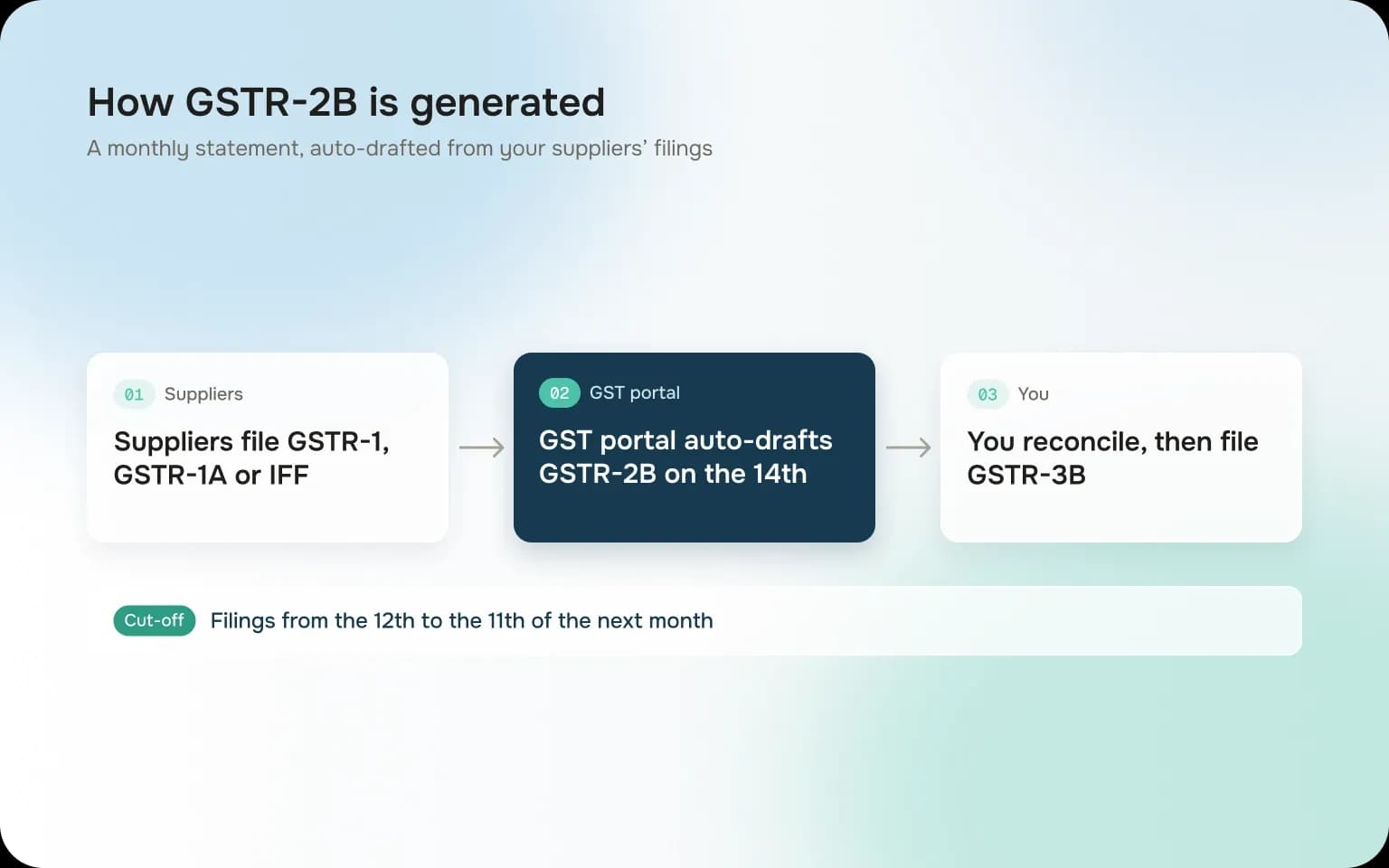
GSTR-2B is an auto-drafted statement of the input tax credit available to you for a tax period. The portal builds it from what your suppliers report in GSTR-1, GSTR-1A and IFF, plus ISD distributions and import data. You do not file it, and you cannot edit it. Errors in it can only be fixed by the supplier.
According to the GST portal's GSTR-2B FAQ, it is generated on the 14th of the month after the tax period, for both monthly and quarterly filers. For monthly suppliers, it picks up GSTR-1 filings from the 12th of the tax month to the 11th of the next month. A document lands in the GSTR-2B of the period in which the supplier files it, not the period of the invoice date. So an April invoice that the supplier reports in June shows up in your June GSTR-2B.
GSTR-2A vs GSTR-2B
Basis | GSTR-2A | GSTR-2B |
|---|---|---|
Nature | Dynamic, changes whenever a supplier files or amends | Static for the period once generated |
Updated | Continuously | Generated on the 14th, recomputed after IMS actions |
ITC split | Shows documents only | Splits ITC into available and not available |
Use for GSTR-3B | Reference only | Basis for claiming ITC |
How IMS feeds GSTR-2B
The Invoice Management System (IMS) lets you accept, reject or keep pending each record a supplier reports. Accepted and untouched records flow into GSTR-2B as available ITC. Rejected records move out of your ITC. Pending records wait. If you act in IMS after the 14th, you can recompute GSTR-2B before filing GSTR-3B. GSTN has also clarified that ITC still auto-populates from GSTR-2B into GSTR-3B, so IMS adds a review step rather than replacing the flow.
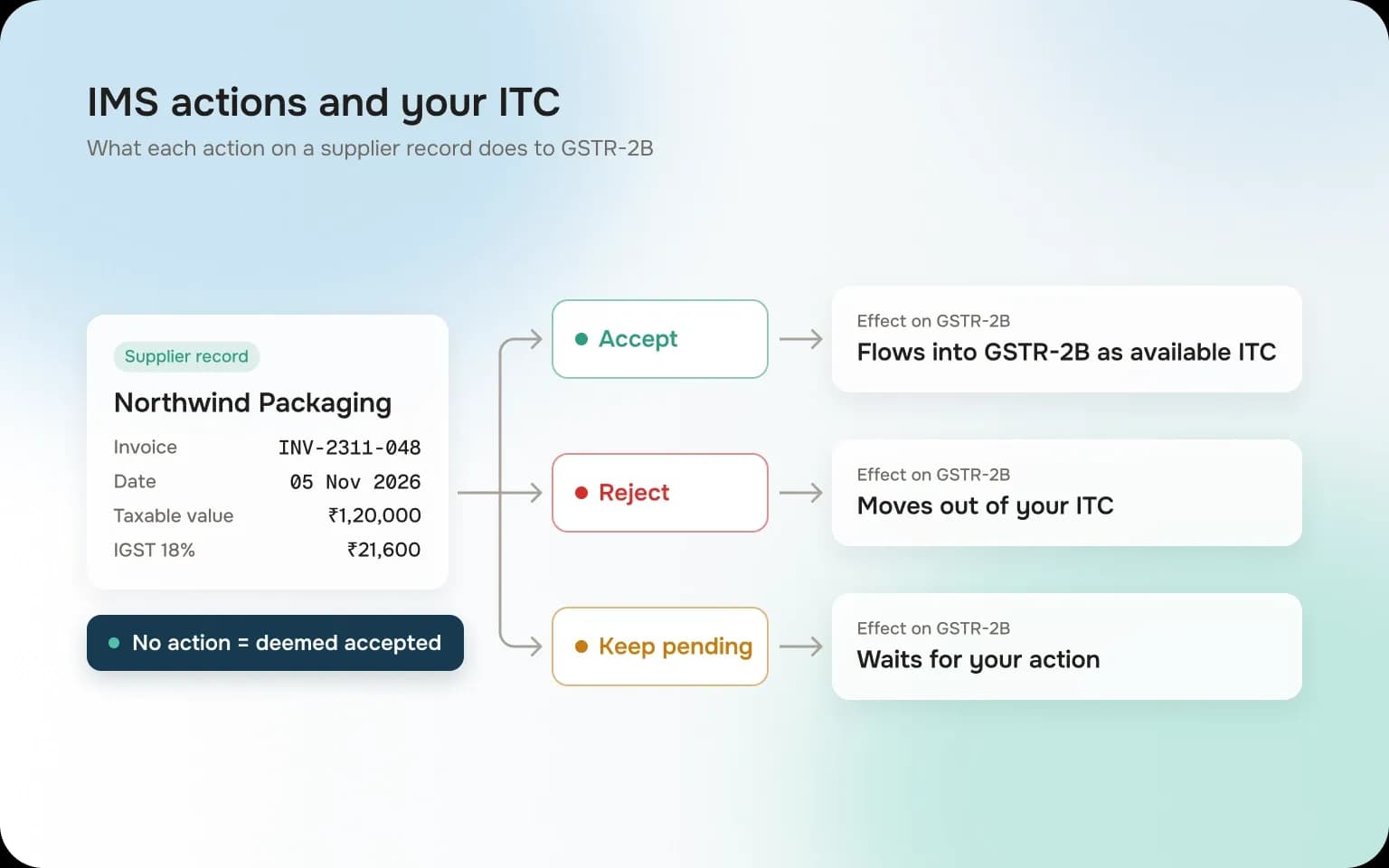
Two IMS rules catch teams out. Records you leave untouched are deemed accepted when GSTR-2B is generated, so silence counts as a yes. And GSTR-2B is sequential: if you have not filed the previous period's GSTR-3B, the portal does not generate GSTR-2B on the 14th until you file it. Brands with several state registrations often hit this when one GSTIN files late. Credit notes kept pending can only be held for about one tax period before they follow default processing.
Why GSTR-2B Reconciliation Matters
Five rules turn GSTR-2B from a reference into a hard limit on your credit.
Rule | What it says | What it means for you |
|---|---|---|
Section 16(2)(aa) and Rule 36(4) | ITC only if the supplier reported the invoice and it appears in your GSTR-2B (from 1 January 2022) | No GSTR-2B entry, no claim this month |
Section 16(2)(c) | The supplier must actually pay the tax | A supplier who files GSTR-1 but not GSTR-3B puts your credit at risk |
Rule 37A | If the supplier has not filed GSTR-3B by 30 September after the year ends, you must reverse the ITC by 30 November, or pay it with interest | Track supplier GSTR-3B filing, not just GSTR-1 |
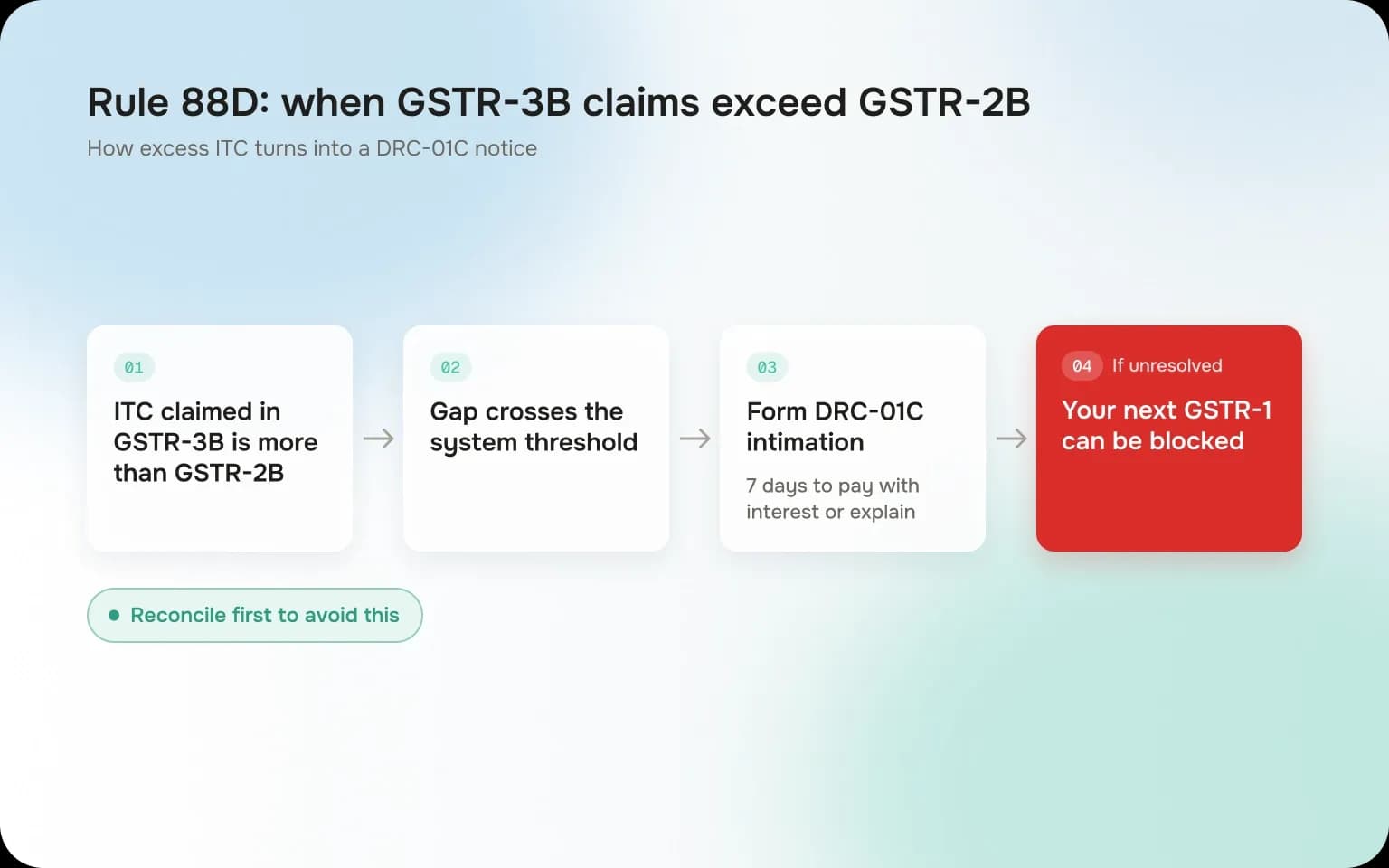
Rule 88D | If ITC claimed in GSTR-3B exceeds GSTR-2B beyond a threshold, you get Form DRC-01C and have 7 days to pay or explain | Unexplained gaps can block your next GSTR-1 |
Section 16(4) | ITC for a year must be claimed by 30 November of the next year, or the annual return date if earlier | Invoices still missing by then may be lost for good |
Rule 88D leaves the trigger to a limit set on the portal, and the exact figures are not published in the rule itself. So treat any GSTR-3B claim that GSTR-2B does not support as a risk, however small.
Rule 37 adds a payment test: if you do not pay a supplier within 180 days of the invoice date, you must reverse the ITC until you pay. That makes reconciliation a joint job for tax and accounts payable.
The GSTR-2B Reconciliation Process, Stage by Stage
Here is the monthly calendar for a monthly filer.
When | What happens |
|---|---|
During the month | Book purchase invoices with full GST details |
By the 11th | Monthly suppliers file GSTR-1 for the previous month |
By the 13th | Quarterly suppliers file IFF or quarterly GSTR-1 |
14th | GSTR-2B for the previous month is generated |
14th to 18th | Match, act in IMS, follow up with suppliers |
By the 20th | Recompute GSTR-2B if needed, then file GSTR-3B |
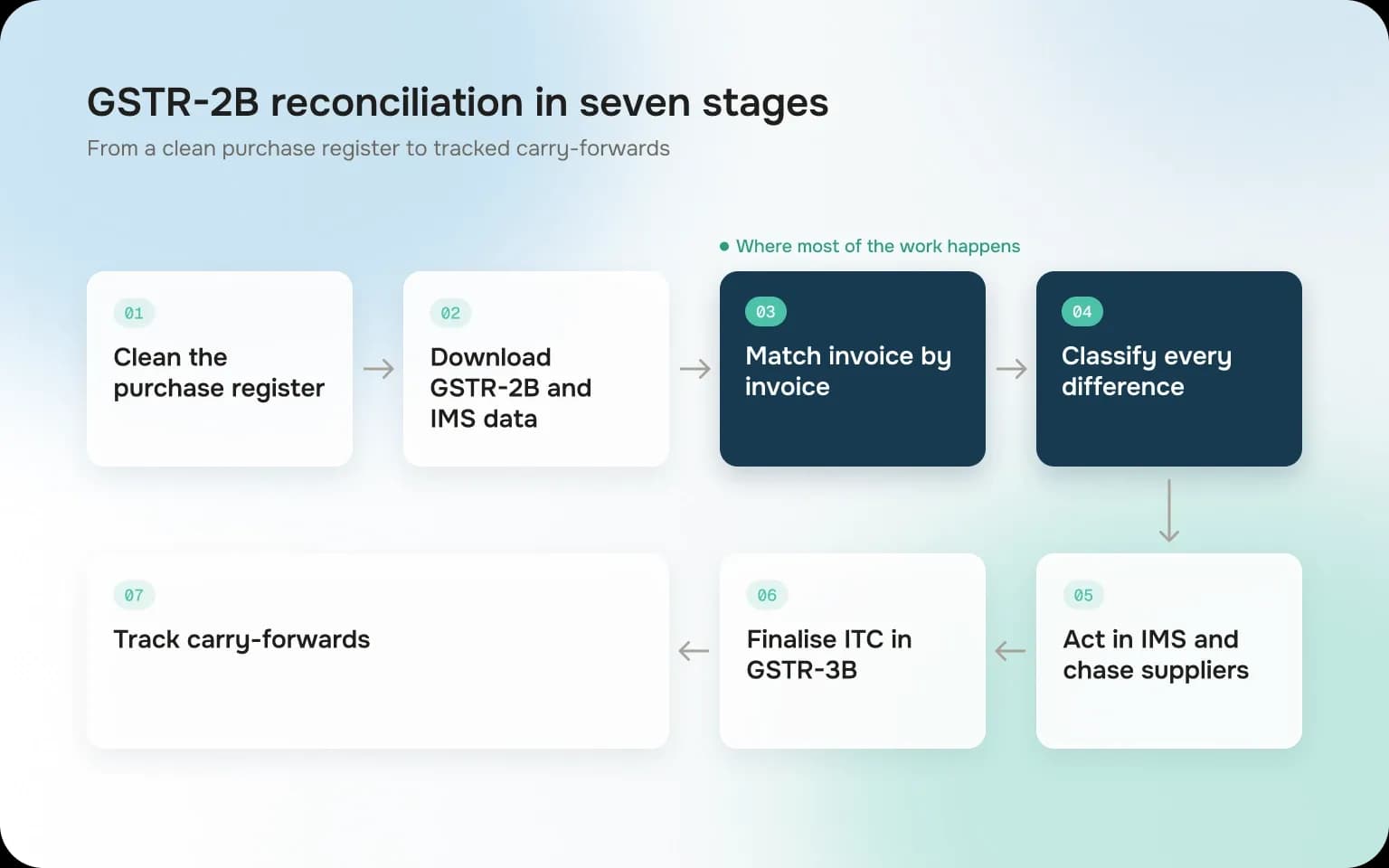
Stage 1: Clean the purchase register
For every purchase invoice, record the supplier GSTIN, invoice number and date, taxable value, tax by head (IGST, or CGST and SGST), place of supply and whether reverse charge applies. Tag blocked credits under Section 17(5), such as most food and staff welfare purchases, so you never claim them by mistake.
Stage 2: Download GSTR-2B and IMS data
On or after the 14th, download GSTR-2B for the period as Excel or JSON from the GST portal, or pull it into your ERP. Download the IMS records too, so you can see what is accepted, rejected and pending.
Stage 3: Reconcile GSTR-2B with your books, invoice by invoice
Match on supplier GSTIN and invoice number first, then compare date, taxable value and tax amounts. Normalise invoice numbers before matching, because "INV/24-25/0326" in your books and "326" on the portal are often the same document. Agree a small rounding tolerance in writing so that a one-rupee gap does not become an exception.
Stage 4: Classify every difference
Put each line into one bucket: matched, mismatched on value, mismatched on a detail, only in GSTR-2B, or only in your books.
Stage 5: Act in IMS and follow up with suppliers
Accept what is correct. Reject what is not yours or is wrong. Keep pending what needs checking. For invoices missing from GSTR-2B, email the supplier with the invoice number, date and amount, and ask them to report it in their next GSTR-1 or GSTR-1A.
Stage 6: Finalise the ITC claim in GSTR-3B
Recompute GSTR-2B if you acted in IMS after the 14th. Claim only ITC that GSTR-2B supports and your books confirm. Reverse blocked credits and any credit due under Rule 37. Keep a list of invoices carried forward so you claim them in the month they appear.
Stage 7: Track carry-forwards and year-end deadlines
Each month, check the carried-forward list against the new GSTR-2B. Every September, check whether suppliers have filed GSTR-3B for the year, so you can reverse credit under Rule 37A by 30 November if they have not. Claim any remaining eligible ITC before the Section 16(4) deadline.
GSTR-2B vs GSTR-3B Reconciliation
After filing, compare the ITC claimed in Table 4 of GSTR-3B with GSTR-2B for the same period. Every difference should have a reason you can show: a carried-forward invoice claimed late, a blocked credit, or a reversal. This is the comparison Rule 88D runs automatically, so run it yourself first. Report reversals you expect to reclaim, such as Rule 37 or Rule 37A reversals, in Table 4(B)(2). When you reclaim them, show the amount in Table 4(A)(5) and disclose it in Table 4(D)(1). The portal tracks these in the Electronic Credit Reversal and Re-claimed Statement.
GSTR-2B Mismatch Types and How to Resolve Them
Mismatch | Common cause | What to do |
|---|---|---|
In books, not in GSTR-2B | Supplier filed late, missed the invoice, or used a wrong GSTIN | Hold the ITC, ask the supplier to report it, claim it in the month it appears |
In GSTR-2B, not in books | Invoice not received or not booked yet, or not your purchase | Check with the receiving team and AP; book it, or reject it in IMS if it is not yours |
Value or tax mismatch | Wrong rate, discount shown differently, typing error | Find which side is wrong; ask the supplier to amend, or correct your entry |
Detail mismatch | Invoice number format, date, place of supply, or IGST booked as CGST and SGST | Fix your books if the error is yours; otherwise ask for an amendment |
Different period | Supplier reported the invoice in a later month | Mark it as timing; claim it in the later period |
Credit note in GSTR-2B | Supplier reported a credit note against you | Reverse the matching ITC; reject in IMS only if the credit note is wrong |
ITC not available | Supplier filed after the time limit, or place of supply issue | Do not claim; resolve with the supplier |
A worked Example
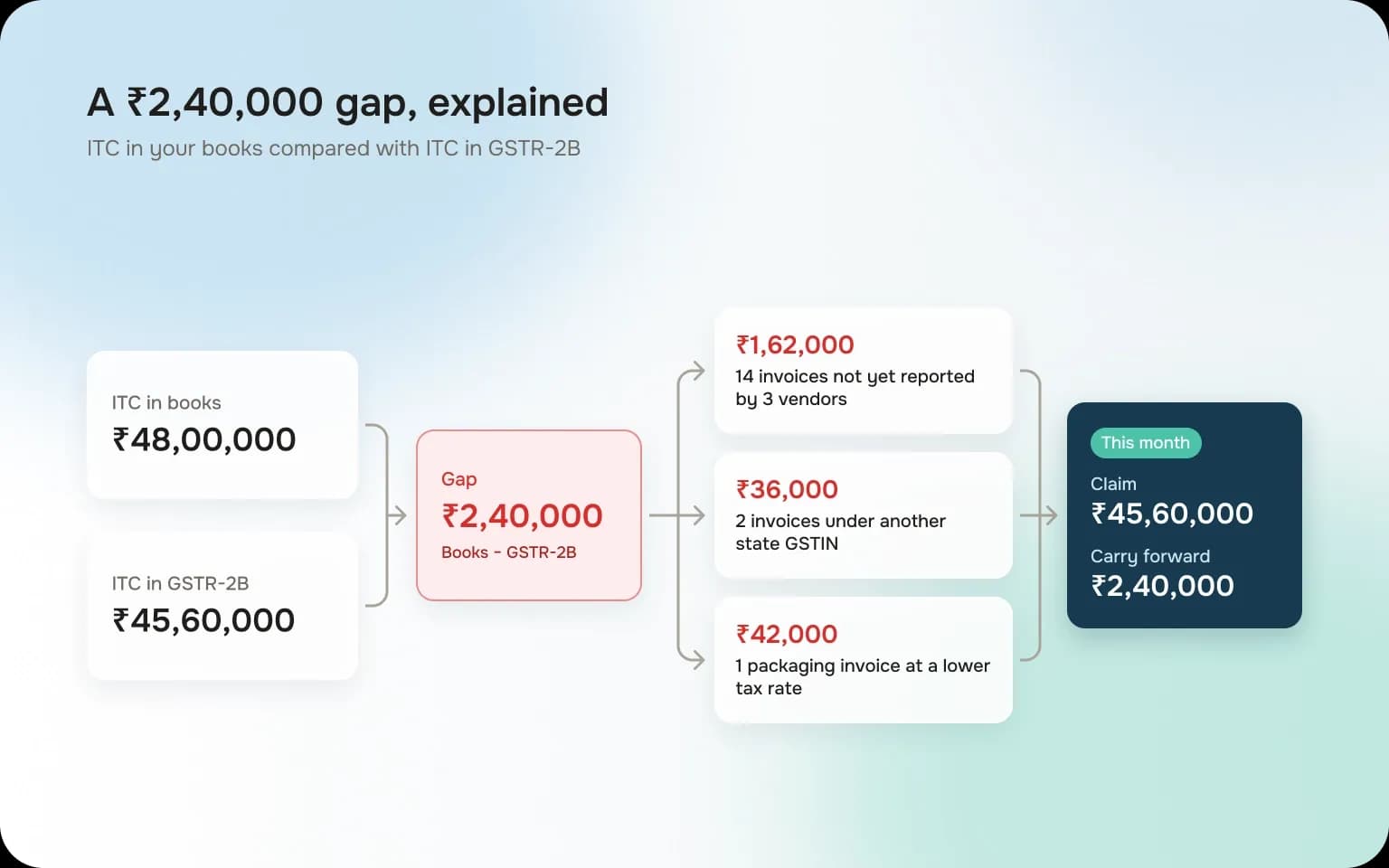
A brand's purchase register for October shows ₹48,00,000 of ITC across 620 invoices. The October GSTR-2B shows ₹45,60,000. The ₹2,40,000 gap breaks down like this:
Reason | ITC (₹) | Action |
|---|---|---|
14 invoices not yet reported by 3 vendors | 1,62,000 | Hold, follow up, claim when they appear |
2 invoices reported under the brand's other state GSTIN | 36,000 | Ask the vendor to amend to the correct GSTIN |
1 packaging invoice reported at a lower tax rate | 42,000 | Ask the vendor to amend the rate |
The brand claims ₹45,60,000 in October and carries ₹2,40,000 forward, to be claimed as each invoice is reported or corrected. Claiming the full ₹48,00,000 would leave a gap in GSTR-3B that GSTR-2B does not support. This is an illustrative example.
If finding gaps like these takes your team days every month, it helps to catch them earlier. See how Finifi's accounts payable automation runs GSTR-2B checks on each invoice as it arrives.
How to Do GSTR-2B in Reconciliation: Excel, Tally or a Tool
GSTR-2B reconciliation in Excel
Excel works when you have a few hundred invoices a month and one GSTIN.
- Download GSTR-2B as Excel and export your purchase register for the same period.
- In both sheets, create a match key: supplier GSTIN plus the invoice number with spaces, slashes, dashes and leading zeros removed.
- Use XLOOKUP (or VLOOKUP) on the key to pull GSTR-2B values next to your books.
- Add difference columns for taxable value and each tax head, and flag anything above your rounding tolerance.
- Use a pivot table by supplier GSTIN to see which vendors account for most of the gap.
The weak spots are fuzzy invoice numbers, credit notes, amendments and anything spread across months. Those need manual judgement every time.
GSTR-2B reconciliation in Tally Prime
TallyPrime can download GSTR-2B from the portal and compare it with your vouchers. It sorts entries into reconciled, mismatched, available only in books and available only on the portal, and lets you fix voucher details such as the GSTIN or invoice number. It works well when Tally is your books of record and purchase entries are accurate.
The GST portal's offline matching tool
The portal offers a free offline matching tool that opens the GSTR-2B JSON and compares it with purchase data you load in its template. It is useful for small volumes and spot checks.
When a dedicated reconciliation tool makes sense
Consider a tool when one or more of these apply:
- Thousands of purchase invoices a month, or several GSTINs
- Many vendors with inconsistent invoice numbering
- Repeated DRC-01C intimations or large carried-forward balances
- A need to track vendor follow-ups and keep an audit trail
A good tool matches on more than invoice number, handles credit notes and amendments, tracks items across months and lets you message vendors from the same screen.
Common Mistakes and Best Practices
Mistakes to avoid
- Claiming from the purchase register. If an invoice is not in GSTR-2B, the credit is not available yet, however genuine the purchase.
- Ignoring credit notes. A supplier's credit note reduces your ITC. Missing it overstates your claim.
- Losing track of carry-forwards. Invoices held back this month need to be claimed when they appear, or they quietly lapse after the Section 16(4) deadline.
- Checking GSTR-1 but not GSTR-3B. A supplier who reports invoices but does not pay tax triggers Rule 37A reversals later.
- Accepting everything in IMS by default. Review before you accept, especially credit notes, which change both your ITC and your supplier's liability.
Best practices
- Reconcile monthly, not at year end. Small gaps are easy to fix in the month they appear.
- Build a vendor scorecard. Track which suppliers report late or wrongly, and raise it in vendor reviews.
- Hold payment for repeat offenders. Link part of the payment to the invoice appearing in GSTR-2B, if your contracts allow it.
- Keep evidence. Save the GSTR-2B version, IMS actions and supplier emails for each month, in case of a DRC-01C intimation or audit.
Automating GSTR-2B Reconciliation
The business challenge
GSTR-2B reconciliation has to fit between the 14th and the 20th. A consumer brand may get thousands of vendor invoices a month, each in its own format, and every unmatched one holds back credit and cash.
How companies usually solve it
Most teams export GSTR-2B and the purchase register into Excel and match them with lookups. Mismatches go into a separate tracker, and vendor follow-ups happen over email. The work is repeated every month, the logic lives in one person's spreadsheet, and carried-forward invoices are easy to lose.
The automated approach
The better fix is to catch GST problems when the invoice arrives, not after GSTR-2B is generated. That is how Finifi's accounts payable automation works:
- Reads every invoice from PDFs, scans, spreadsheets and e-invoices, and captures GSTIN, invoice number, rate and tax amounts.
- Runs GST checks on each invoice, including GSTR-2A and GSTR-2B, TDS, MSME, reverse charge and IRN checks.
- Matches invoices to the PO and GRN at line level, flagging rate and quantity variances before approval.
- Sends exceptions to one workflow with comments and approvals, so vendor issues are tracked instead of buried in email.
- Works with your ERP, including SAP, Oracle, Dynamics 365, Zoho, Infor and Tally, and typically goes live in about two weeks.
Consumer brands including Happilo, Bikaji, Jyothy Labs and Chheda's use Finifi.
If the monthly GSTR-2B rush is holding back your ITC, talk to the Finifi team to see how it would work with your vendors and your ERP.
Frequently Asked Questions
What is GSTR-2B reconciliation?
GSTR-2B reconciliation is the process of matching your purchase register with GSTR-2B, the auto-drafted input tax credit statement on the GST portal. It shows which invoices your suppliers have reported, which are missing or mismatched, and how much ITC you can safely claim in GSTR-3B.
When is GSTR-2B generated?
GSTR-2B is generated on the 14th of the month after the tax period, for both monthly and quarterly filers. If you take action in IMS after the 14th, you can recompute it before filing GSTR-3B.
Can I claim ITC if an invoice is not in GSTR-2B?
No. Since 1 January 2022, Section 16(2)(aa) and Rule 36(4) allow ITC only on invoices and debit notes that appear in your GSTR-2B. Hold the credit, ask the supplier to report the invoice, and claim it in the month it appears.
What is the difference between GSTR-2A and GSTR-2B?
GSTR-2A is dynamic and changes whenever a supplier files or amends a document. GSTR-2B is a static statement for the period that splits ITC into available and not available. Use GSTR-2B to decide what to claim, and GSTR-2A to spot late filings.
What happens if ITC claimed in GSTR-3B is more than GSTR-2B?
If the excess crosses the system threshold, you receive an intimation in Form DRC-01C under Rule 88D. You then have 7 days to pay the excess with interest or explain the difference, otherwise filing of your next GSTR-1 can be blocked.
What should I do if a supplier has not filed GSTR-3B?
Under Rule 37A, if the supplier has not filed GSTR-3B for the period by 30 September after the financial year ends, you must reverse the related ITC by 30 November. You can claim it again once the supplier files.
How often should GSTR-2B reconciliation be done?
Every month, between the 14th, when GSTR-2B is generated, and the GSTR-3B due date. Monthly reconciliation keeps gaps small, makes supplier follow-ups easier and avoids year-end surprises.